

When your users interact with Smile's products — whether connecting their employment accounts through Wink, submitting documents via Snap, or completing identity verification through Signals — they are sharing sensitive personal information. Collecting and recording explicit, verifiable consent from your users is not only a legal and ethical requirement in most jurisdictions, it is a core part of how Smile is designed.
Smile requires you to pass evidence of user consent whenever you initiate a request that processes personal data on behalf of a subject. This evidence takes the form of the Consent Object, a structured payload that records what the user agreed to, the text of the consent document they saw, and when they gave their consent.
To make consent management easier and more consistent, Smile provides the Consent Templates API. Instead of constructing the full Consent Object on every request, you can store your consent document details once with Smile and reference them by consentTemplateId. This reduces repetition, ensures you always reference the right version of your consent document, and gives you a centralized place to manage multiple consent documents as they evolve over time.
How Smile Uses Consent
Consent is a required part of any request that processes personal data. The specific integration point varies by product:
Smile Wink — Account Linking
When users connect their employment accounts through the Wink Widget, they pass through a built-in consent flow before any data is retrieved. The consent given during this flow is managed by Smile and linked to the user's account. You do not need to pass a Consent Object separately for account-linked data.
Smile Snap — Document Processing and Smile Flip — Form Processing
Document submissions and form data collection are covered by the consent the user gives during the Wink Widget flow. If you are integrating with Snap or Flip outside of the Wink Widget, consult your account manager about your applicable consent obligations.
Smile Signals — Risk Screening and Verification
Every screening request or verification request must include a Consent Object. Smile will reject requests that do not include evidence of the subject's consent. You must provide either the full consent details inline, or reference a stored Consent Template via consentTemplateId.
The Consent Object
The Consent Object is the standard structure for recording user consent in Smile API requests. It appears as a required field in the request body of Signals APIs.
| Attribute | Type | Description |
|---|---|---|
| type | string | Your consent document's internal document name, e.g. "Product X Terms & Conditions" or "App Privacy Policy" |
| version | string | Your internal version identifier for your consent document, for your tracking and audit purposes |
| consentedWith | string | The exact text or phrase with which the user gave their consent, such as the label of a checkbox or a phrase they signed. This should reflect what the user actually saw. |
| consentedAt | date-time | The date and time when the subject gave their consent, in ISO 8601 / Zulu time format |
| consentTemplateId | string | The ID of a Consent Template stored with Smile. If provided, Smile will use the stored template details. You may still provide the other fields to override specific values. |
Sample Consent Object
{
  "type": "Terms and Conditions",
  "version": "2.1.0",
  "consentedWith": "I agree to the terms and conditions",
  "consentedAt": "2021-04-14T09:30:24Z",
  "consentTemplateId": "ct-5b79399a68524234bb0ead472648282d"
}
Using a Consent TemplateWhen you provide a
consentTemplateId, Smile will retrieve the stored template and use its details to fulfill the consent record. You may omit the other Consent Object fields if the template already contains the correct information, or supply them to override specific values for that request.
About Consent Templates
A Consent Template is a stored copy of your consent document details: the document type, title, version, the method by which users show their agreement, and the full text of the consent document. You create templates once and reference them by ID whenever you make a request that requires consent.
This is particularly useful when:
- You have multiple consent documents (e.g., separate terms for different products or markets) and want to keep them organized and referenceable.
- You want to ensure that the consent recorded against any request is consistent and traceable to the exact document version in use at the time.
- You want to minimize the payload size of your API requests by referencing a stored template rather than sending the full consent text inline every time.
You may create your consent templates via API calls using the Consent Template API, or you may use the Developer Portal's Consent Templates section to set it up.
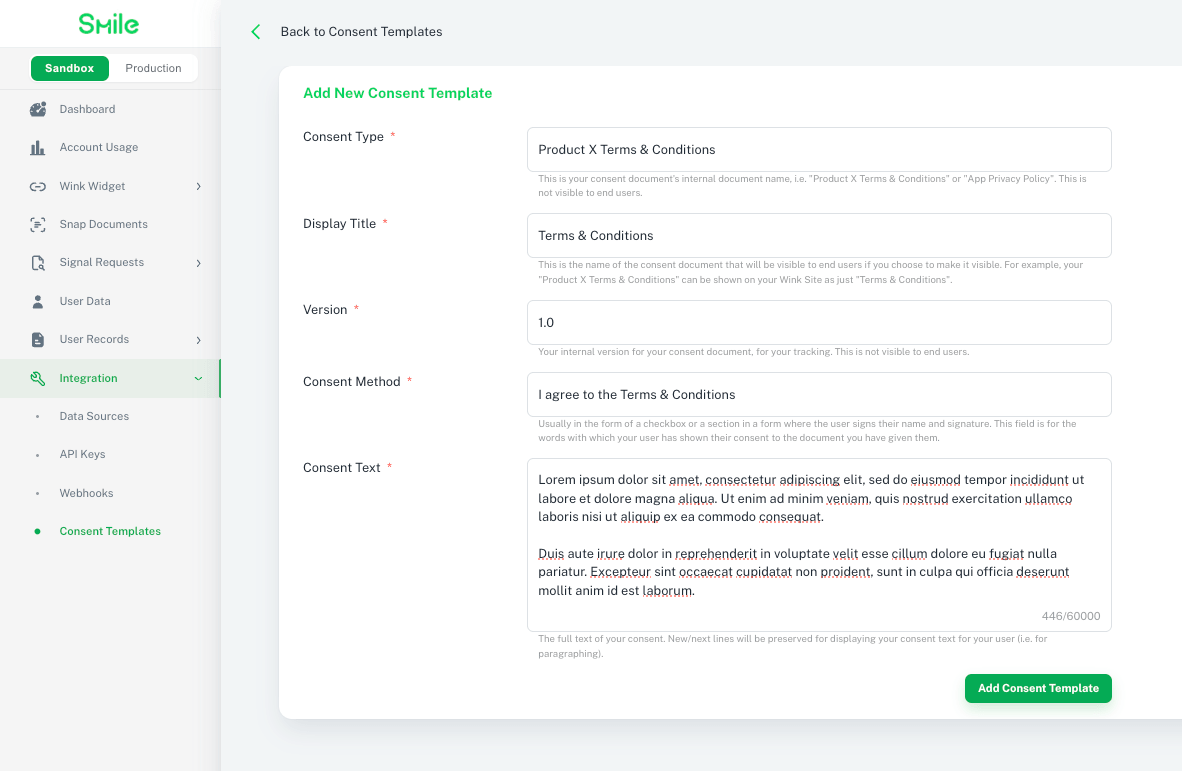
The Consent Template object
| Attribute | Type | Description |
|---|---|---|
| id | string | Unique ID of this consent template on the Smile Network. IDs use the prefix ct-. |
| createdAt | date-time | Date and time when this consent template was created |
| consentType | string | The type of consent document, e.g. "Terms and Conditions" or "Privacy Policy". Max 200 characters. |
| title | string | The display name of the consent document, visible to end users if you choose to expose it. Max 200 characters. |
| version | string | Your internal version identifier for this consent document. Max 64 characters. |
| consentMethod | string | The text or phrase by which the user gives their consent, e.g. "I agree to the terms and conditions". Max 200 characters. |
| consentText | string | The full text content of the consent document. Max 65,535 characters. |
Required fields when creating
When calling POST /consentTemplates, the following fields are required: consentType, version, consentText. All other fields are optional.
Sample Consent Template data
{
  "id": "ct-5b79399a68524234bb0ead472648282d",
  "createdAt": "2021-04-14T09:30:24Z",
  "consentType": "Terms and Conditions",
  "title": "Smile Verification Terms and Conditions",
  "version": "2.1.0",
  "consentMethod": "I agree to the terms and conditions",
  "consentText": "By clicking 'I agree', you authorize ABC Corp to collect, process, and store your personal information for the purpose of identity verification, in accordance with applicable data protection laws. You may withdraw your consent at any time by contacting our support team."
}
Endpoints
| Endpoint | |
|---|---|
| Create consent template | POST /consentTemplates |
| List consent templates | GET /consentTemplates |
| Delete consent template | DELETE /consentTemplates/{id} |