

Smile API implements quota limitations on specific operations to ensure system stability and fair usage. These limitations are calculated based on the following frequencies:
- DAILY: Calculated by number of requests per day
- MONTHLY: Calculated by number of requests per month
- ACCUMULATIVELY: Calculated by total number of requests
NoteQuota limitations are separate from rate limitations, which may affect you if you process high volumes of concurrent calls. For more information, see Rate Limits.
Operations Subject to Quota Limits
The following API operations may be subject to quota limits:
| Operation Name | Description |
|---|---|
CONNECT_ACCOUNT | Connect user account |
CREATE_INVITE | Invite user to connect account |
SUBMIT_ARCHIVE | Submit documents |
REQUEST_VERIFICATION | Request verification data |
REQUEST_RECORD | Request Signals records |
CREATE_MAW | Request Multiple Application Warning |
CREATE_SOCIAL_SECURITY | Create social security record |
CREATE_BLACKLIST | Request blacklist check |
CREATE_FOOTPRINT | Request digital footprint analysis |
ANALYZE_ARCHIVE | Extract document content |
CREATE_USER | Create user |
CREATE_TOKEN | Create token |
CREATE_WINK_SITE | Create Wink Site |
CREATE_WEBHOOK | Create webhook |
Note
- Specific quota limits depend on your account type and service agreement. Please contact the Smile team to obtain your account's specific quota limits.
- Sandbox and Production Mode quotas are not shared and are calculated independently.

Viewing Quota Usage
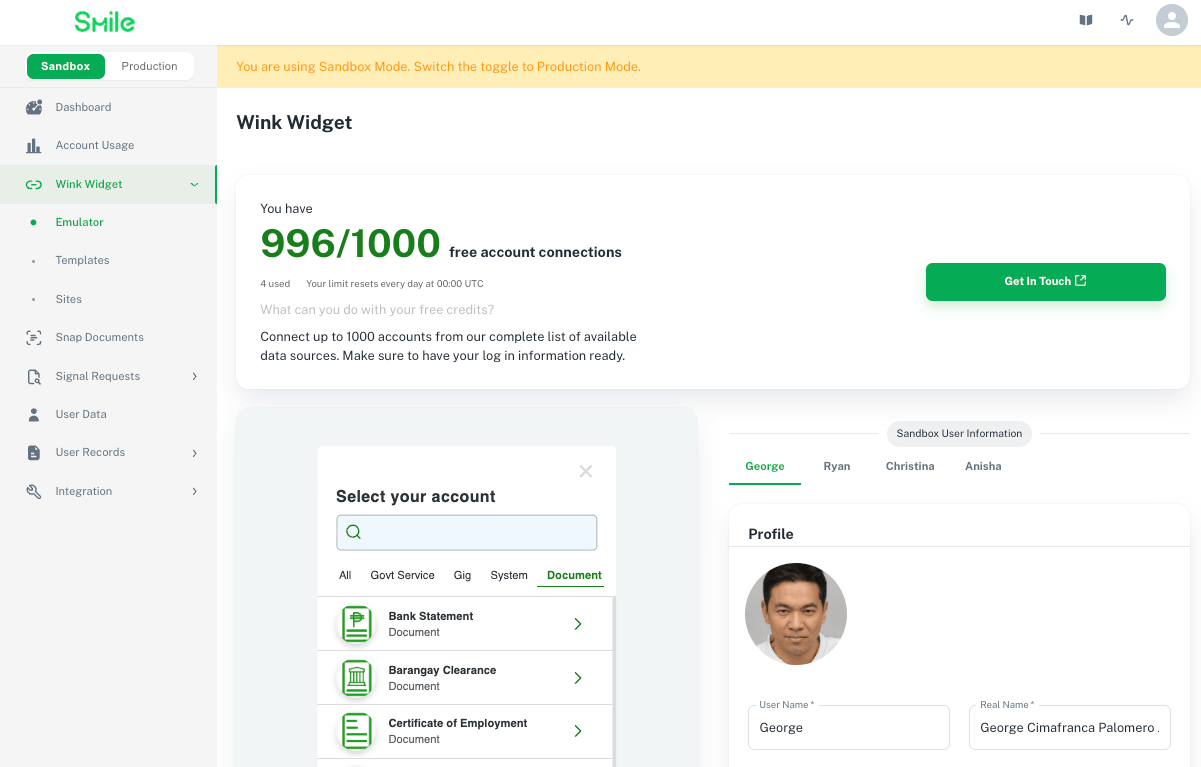
You can monitor quota usage in real-time through the Developer Portal.
Viewing in Developer Portal
- Log in to the Developer Portal
- Navigate to the relevant product page
- If an operation has quota limits, quota usage statistics will be displayed on the product page

Error Handling When Quota is Exhausted
When quota is exhausted, API calls will return an HTTP 403 Forbidden error with corresponding error information in the response. Note that rate limitations will still issue an HTTP 429 Error Code for too many requests but quota limitations will not issue this error code.
| Field | Type | Description |
|---|---|---|
code | string | Error code identifying the error type |
message | string | Error description with solution guidance |
requestId | string | Request ID for troubleshooting and log tracing |
Error Response Example:
{
  "code": "UNAUTHORIZED_ACCESS",
  "message": "[<your tenant id>][<mode>]Your free quota has been used up. Please contact Smile to get more quota",
  "requestId": "5b79399a-6852-4234-bb0e-ad472648282d"
}
Quota Adjustment and Support
How to Refresh your Quota
If your quota usage has been exhausted, you can take the following measures:
- Wait for Reset
- Daily Quota: Automatically resets at UTC 00:00
- Monthly Quota: Automatically resets on the 1st of each month at UTC 00:00
- Accumulative Quota: Does not reset automatically; contact Smile team for adjustment
- Contact Smile Team
- For temporary or permanent quota increases, please contact Smile support team
Contact Support
- Communication Group (Recommended): Communication groups created on messaging platforms like WeChat, WhatsApp, etc.
- Email: [email protected]
- Website: https://www.getsmileapi.com/contact-us
Applying for Quota Increase
When contacting the support team, please provide the following information to expedite processing:
- TenantID or Email Address: Account identifier
- Quota Type: Type to increase (Daily/Monthly/Accumulative)
- Current Usage: Current quota usage status
- Desired Limit: Target quota limit you wish to adjust to
- Business Scenario (Optional): Helps the team better understand your requirements

Frequently Asked Questions
Q: When does quota reset?
A: Based on quota frequency, there are 3 scenarios:
- Daily Quota: Automatically resets at UTC 00:00
- Monthly Quota: Automatically resets on the 1st of each month at UTC 00:00
- Accumulative Quota: Does not reset automatically; requires Smile team assistance
Q: Can I monitor quota usage in real-time?
A: Yes, you can view quota usage in real-time through the Developer Portal. We are also developing webhook notification features that will proactively notify you when quota approaches its limit.
Q: Will historical data be lost if quota is exhausted?
A: No. Quota limits only affect new API calls and do not impact already stored data or completed requests.
Q: Can Sandbox and Production Mode quotas be shared?
A: No. Sandbox and Production Mode quotas are calculated independently and do not affect each other.
Q: Can I request a temporary quota increase?
A: Yes. For special situations such as bulk testing, online assessments, etc., please contact Smile support team in advance to apply for a temporary quota increase.