

Smile Shield is Smile API’s Device Profiling and Fingerprinting SDK. It collects device, network, session, and identity signals at important moments in the user journey and returns risk intelligence that can support lending and fraud-prevention decisions.
Shield is designed to provide two complementary categories of metrics:
| Metric category | What it helps assess | Example uses |
|---|---|---|
| Early Payment Default metrics | Signals associated with the likelihood that an applicant may fail to meet their early repayment obligations | Application risk assessment, underwriting enrichment, and manual-review prioritization |
| Antifraud metrics | Signals indicating possible identity inconsistencies, device manipulation, account clustering, location masking, or other suspicious behavior | Account creation, login, loan application, payment, and payout screening |
Shield combines signals from the current device session with Smile’s network intelligence and returns a risk score, supporting reason codes, and detailed intelligence about the device, network, and submitted identity attributes.
Integration is lightweight: initialize the Shield SDK in your client application, collect the Shield session ID, and create an assessment from your server.
Risk signals, not final decisionsShield provides risk signals to support your decision process. It should not be used as the sole basis for approving or rejecting an applicant, determining creditworthiness, or concluding that fraud has occurred.
Combine Shield results with your credit policy, fraud rules, verification processes, and applicable regulatory requirements.

Integration Steps
Integrating Shield requires a small client-side SDK implementation and a server-side API call.
Prerequisites
Before starting the integration, ensure that:
- You have registered an account on the Smile Developer Portal.
- Shield has been enabled for your organization.
- You have your Sandbox API Key and API Secret.
- Your server can securely store API credentials and make authenticated API requests.
- You have selected where Shield profiling will run in your user journey.
- You have determined how your application will use Shield results in its decision logic.
Keep credentials server-sideNever include your API Key or API Secret in a browser, mobile application, public repository, or client-side request. Create assessments from your backend server.
1. Obtain a user token
Your backend must obtain a short-lived user token from Smile API. Pass this token to the client application when initializing the Shield SDK.
The token must be requested from your server so that your API credentials remain private.
See API Authentication and the Users API for more information.
2. Initialize the Shield SDK
Initialize the SDK in your web or mobile application using the user token.
When Shield starts, it creates a profiling session and returns a sessionId. Your client must send this sessionId to your backend.
3. Complete device profiling
Shield collects device, browser, network, and session signals and reports whether profiling completed successfully.
Wait for:
profilingStatus = COMPLETEDprofilingResultCode = SUCCESS
A session that is still running, failed, or timed out cannot be assessed successfully.
4. Create an assessment
After profiling completes, your backend sends the sessionId and available applicant attributes to:
POST /shield/sessions/{sessionId}/assessmentsApplicant attributes are optional individually, but providing more information produces a richer assessment. Address and phone information are particularly useful for identity-correlation and network-consistency checks.
5. Use the result in your decision process
The response contains an overall risk score, reason codes, and supporting device, network, identity, and session intelligence.
Use these results as inputs to your:
- Credit policy or scorecard
- Fraud rules engine
- Step-up verification flow
- Manual-review queue
- Monitoring and investigation tools
6. Test in Sandbox
Complete the full workflow in Sandbox before moving to Production:
| Environment | Base URL |
|---|---|
| Sandbox | https://sandbox.smileapi.io/v1 |
| Production | https://open.smileapi.io/v1 |
Sandbox returns a standard mock assessment for any request that passes validation. It is suitable for testing authentication, request validation, callbacks, status handling, response parsing, and decision-system integration.
7. Move to Production
Before switching to Production:
- Replace Sandbox credentials with Production credentials.
- Change the API base URL to
https://open.smileapi.io/v1. - Confirm that Shield is enabled for the Production tenant.
- Verify consent and disclosure requirements.
- Confirm production quotas and rate limits.
- Test with a small number of controlled transactions.
- Monitor API failures, timeouts, and unexpected results.

Quickstart
Runnable samples for Web, Android, iOS, React Native, and Flutter are available in the Smile Quickstart repository.
The shield/ directory contains the Shield examples for each supported client.
Supported clients
| Client | Sample |
|---|---|
| Web | Available in the Shield Quickstart repository |
| Android | Available in the Shield Quickstart repository |
| iOS | Available in the Shield Quickstart repository |
| React Native | Available in the Shield Quickstart repository |
| Flutter | Available in the Shield Quickstart repository |
Sandbox assessment values
The following values may be used to create a self-explanatory Sandbox request:
| Field | Test value |
|---|---|
emailAddress | [email protected] |
firstName | George |
lastName | Palomero |
phoneNumber | 63955991234 |
address.country | PH |
Any valid Sandbox request returns the same mock assessment.
Expected result:
{
  "status": "COMPLETED",
  "resultCode": "SUCCESS"
}
Other result codes include:
| Result code | Meaning | Recommended handling |
|---|---|---|
SUCCESS | The assessment completed successfully | Process the result |
NO_DATA | No usable assessment data was available | Continue using your fallback policy |
SYSTEM_ERROR | An internal processing error occurred | Retry according to your error-handling policy |
SERVICE_UNAVAILABLE | A required service was unavailable | Retry with backoff |
Successful integrationYour basic integration is complete when the SDK produces a successful Shield session, your backend creates an assessment, and your decision system can process the returned result.

Client SDK
End-to-end flow
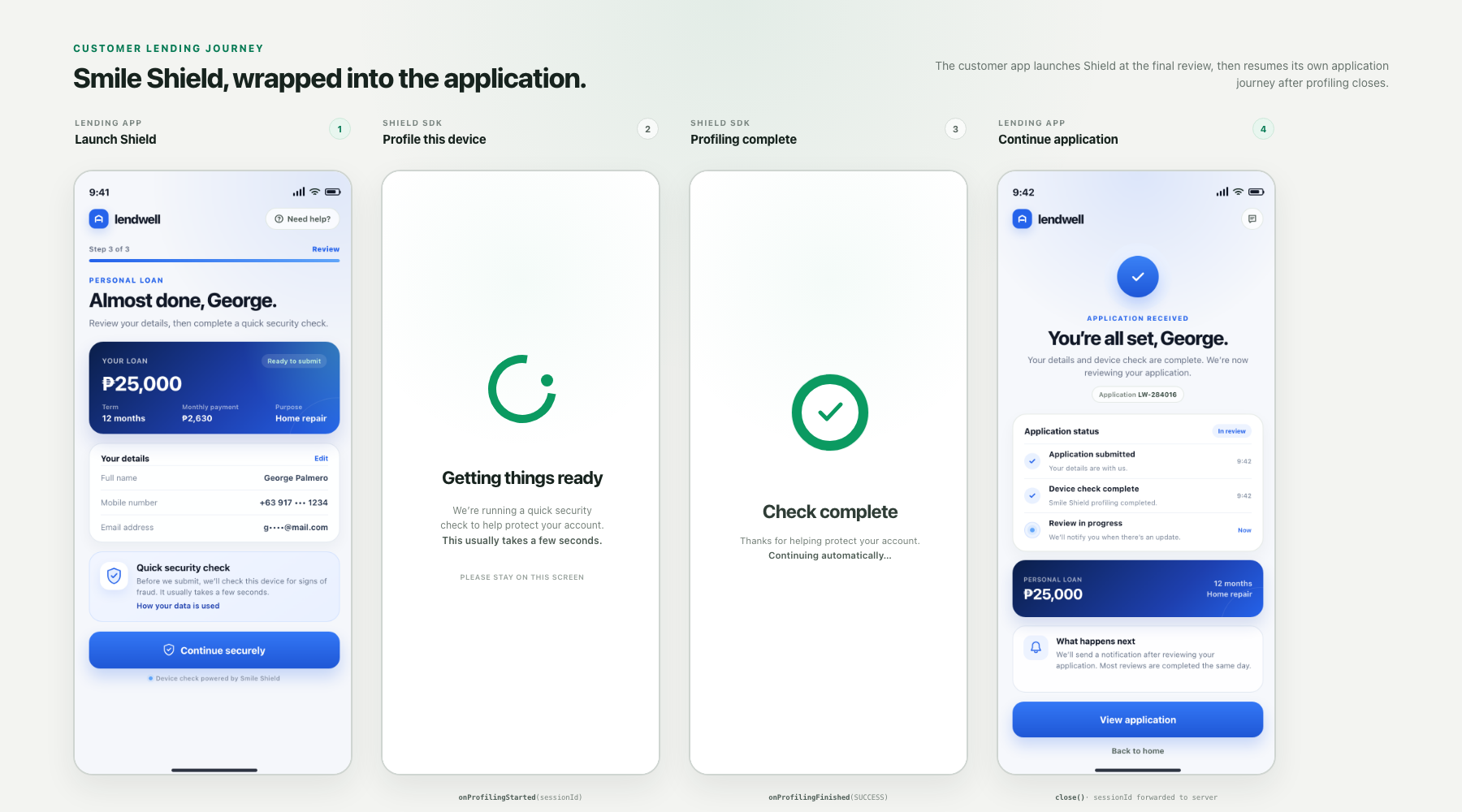
sequenceDiagram
    participant Mobile as Mobile App
    participant SDK as Shield SDK
    participant Server as Your backend
    participant Smile as Smile API Server

    Server->>Smile: 1. request a userToken
    Smile-->>Server: 2. return the accessToken
    Server-->>Mobile: 3. hand the userToken to the app
    Mobile->>SDK: 4. initialise and call start()
    SDK->>Smile: 5. create a Shield session
    Smile-->>SDK: 6. return the sessionId
    Smile-->>Server: 7. Webhook SHIELD_SESSION_PROFILING_STARTED
    Note over SDK: 8. loading screen shown, device signals collected
    SDK-->>Mobile: 9. onProfilingStarted(sessionId)
    SDK->>Smile: 10. report profiling finished (success or timeout)
    Smile-->>Server: 11. Webhook SHIELD_SESSION_PROFILING_FINISHED
    SDK-->>Mobile: 12. onProfilingFinished(profilingResultCode)
    Mobile-->>Server: 13. forward the sessionId
    Server->>Smile: 14. POST create assessment (applicant attributes)
    Smile-->>Server: 15. return the risk result
UI changes from Step 4 - 12
Web installation
Add the Shield JavaScript SDK to your page:
<script src="https://web.smileapi.io/shield/v1/shield.v1.js"></script>Initialize a new Shield instance:
const shield = new SmileShield({
  userToken,
  ui: {
    layout: "popup",
    title: "Verifying your identity",
    description: "We're running a quick security check.",
    primaryColor: "#0B9758"
  },

  onProfilingStarted(info) {
    // info.sessionId   string    session id — send it to your backend
    // info.mode        string    'remote' (real profiling) or 'mock' (local UI work)
    // info.userId      string?   user the session belongs to, undefined when not supplied
    // info.startedAt   string    ISO 8601 start timestamp
  },
  onProfilingFinished(info) {
    // info.sessionId             string    same session id
    // info.durationMs            number    time from start() to completion, ms
    // info.userId                string?   user the session belongs to
    // info.profilingResultCode   string    'SUCCESS' completed, 'TIMEOUT' gave up waiting
    // info.finishedAt            string    ISO 8601 finish timestamp
  },
  onError(err) {
    // err.code      string    error code, see below
    // err.message   string    human readable message
    // err.detail    any?      original error object, for debugging only
  }
});

await shield.start();
Create a new SDK instance for every profiling attempt. If the user starts profiling again on the same page, call close() on the previous instance before creating another one.
Loading screen
The Shield loading screen is always displayed while profiling is in progress. It cannot be disabled.
You can customize:
| Setting | Description |
|---|---|
layout | Display the SDK as popup or page |
title | Heading displayed during profiling |
description | Supporting text displayed during profiling |
primaryColor | Primary interface color |
Explain the profiling stepUse clear, user-friendly loading-screen copy that explains that a security check is taking place. Ensure that the language is consistent with your privacy notice and consent flow.
SDK callbacks
| Callback | When it is triggered | Important values |
|---|---|---|
onProfilingStarted | Shield creates the session and begins profiling | sessionId |
onProfilingFinished | Profiling succeeds or the client times out | profilingResultCode |
onError | The SDK encounters an error | code, message |
Status and result codes
| Field | Value | Meaning |
|---|---|---|
profilingStatus | STARTED | Profiling is in progress |
profilingStatus | COMPLETED | Profiling completed successfully |
profilingStatus | ERROR | Profiling ended without successful confirmation |
profilingResultCode | SUCCESS | Profiling was successfully confirmed |
profilingResultCode | TIMEOUT | The client stopped waiting before profiling was confirmed |
POST /shield/sessions/{sessionId}/assessments requires a session with:
profilingStatus = COMPLETED
profilingResultCode = SUCCESS
If the session is still profiling, the assessment request returns 409 Conflict.
If profiling failed or timed out, start a new Shield session before creating another assessment.

Understanding the Results
A Shield assessment returns an overall score together with the signals that influenced it.
Overall risk score
| Field | Meaning |
|---|---|
result.riskScore.value | Overall risk score from 1 to 999 |
result.riskScore.range | Minimum and maximum values for the score |
result.riskScore.interpretation | Scoring direction; higher_is_riskier means higher values represent greater risk |
result.riskScore.reasonCodes[] | Ranked explanations of the signals that raised or lowered the score |
Each reason code may include:
rankcodedescriptioneffect
Do not assume a universal thresholdThe appropriate action for a score depends on your market, product, customer population, risk appetite, and regulatory obligations.
Validate thresholds against your own outcomes before using them in Production.
Result groups
| Result object | Information provided |
|---|---|
applicantSummary | Attributes derived from the submitted applicant information |
riskScore | Overall risk score and reason codes |
digitalIdentity | Confidence and consistency across submitted identity attributes |
phoneIntelligence | Phone validity, carrier, line type, geography, and related information |
emailIntelligence | Email existence, tenure, ownership, and prior associations |
domainIntelligence | Email-domain ownership, age, registration, and category |
deviceIntelligence | Device identifier, confidence, history, location changes, proxy indicators, and shared-device signals |
networkIntelligence | True, submitted, DNS, and proxy IP information, including location and network characteristics |
sessionBehavior | Behavioral information collected during the profiling session |
policyEngine | Policy score, review status, and risk rating |
Early Payment Default metrics
Early Payment Default metrics can help enrich an existing underwriting or credit-risk process by identifying stability, consistency, and network signals associated with the applicant and device.
Potentially relevant inputs include:
- Device tenure and previous activity
- Frequency or velocity of device activity
- Identity-attribute consistency
- Phone and email tenure
- Address and IP consistency
- Network associations involving the device, phone, email, or IP
Use these metrics as additional features in a scorecard or policy. They do not replace affordability checks, income verification, bureau data, or other underwriting requirements.
Antifraud metrics
Antifraud metrics can help detect behavior that may require additional verification or manual review.
Examples include:
| Signal | Possible interpretation |
|---|---|
| New or unfamiliar device | The applicant is using a device that has not been seen previously |
| Multiple accounts associated with one device | The device may be shared or may be part of an application cluster |
| Multiple emails associated with a device, phone, or IP | Additional identity verification may be appropriate |
| Proxy detected | The user’s apparent network location may be masked |
| Geographic discrepancy | Submitted and observed location information may not be consistent |
| Weak identity correlation | Submitted name, email, phone, address, or IP information may not align |
| Blocklisted-IP association | The device has previously been associated with a flagged IP |
| Unknown session | The device could not be profiled with sufficient confidence |
A single signal does not prove fraud. Evaluate signals together with the overall risk score, reason codes, transaction context, and other verification data.
Policy outcome
result.policyEngine provides a simplified policy-layer outcome:
| Field | Meaning |
|---|---|
score | Policy score produced for the assessment |
reviewStatus | Suggested review disposition |
riskRating | Risk classification associated with the policy score |

Event Notifications
Shield can send webhook notifications when profiling begins and finishes.
| Event | When it is sent | Key fields |
|---|---|---|
SHIELD_SESSION_PROFILING_STARTED | A Shield session is created and profiling begins | sessionId, userId, profilingStatus, startedAt |
SHIELD_SESSION_PROFILING_FINISHED | Profiling finishes successfully or times out | sessionId, profilingStatus, profilingResultCode, finishedAt |
Subscribe to the required events in the Developer Portal and ensure your webhook endpoint can process repeated or delayed deliveries safely.
See Webhooks for subscription and payload details.
Webhooks do not contain assessment resultsShield webhooks are status notifications only. Create or retrieve an assessment through the Shield API to obtain the result.

Maintaining User Data
Shield processes device, network, session, and identity-related information. Your integration should clearly explain the profiling activity to the user and collect consent where required.
The assessment request supports a consent object containing:
| Field | Description |
|---|---|
type | Your internal name for the consent document |
version | Your version identifier for the consent document |
consentedAt | When the user accepted the consent document, in ISO 8601 format |
consentedWith | The text of the button or checkbox accepted by the user |
consentTemplateId | ID of a Consent Template stored in the Developer Portal |
When consentTemplateId is supplied, the stored template provides the relevant consent content.
Data retention
Shield assessment results are retained for 60 days. After 60 days, the assessment result is removed, but the Shield session and assessment records are kept.
| Data | Retention |
|---|---|
| Assessment result | Removed after 60 days |
| Shield session record | Kept |
| Assessment record | Kept |
If you need assessment results for longer than 60 days — for example, for audit, model validation, or dispute handling — store them in your own systems when you receive them.
Assessment records remain available for billing reconciliation after the result has been removed.
Before going live, confirm that your implementation addresses:
- User notice and consent
- Lawful basis for device profiling
- Data minimization
- Access controls
- Retention and deletion
- User-access or deletion requests
- Cross-account and shared-device analysis
- Storage of assessment results in your own systems
- Applicable local privacy and lending regulations

Chargeable Events
Shield is billed per assessment call.
Each successful request to the following endpoint counts as one assessment:
POST /shield/sessions/{sessionId}/assessments| Action | Billable |
|---|---|
| Create a Shield profiling session | No separate charge; session quota applies |
| Create an assessment | Yes |
| List Shield sessions | No |
| List assessments for a session | No |
| Retrieve an existing assessment | No |
| Receive a Shield webhook | No |
Repeated assessments
Every assessment request is billed separately.
| Example | Billing |
|---|---|
| Profiling finishes and one assessment is created | Billed once |
| The same applicant is assessed five times | Billed five times |
| An existing assessment is retrieved five times | No additional assessment charge |
| Assessments for a session are listed | No charge |
Cached results
When the same session and applicant attributes are submitted within the cache window of up to 24 hours, Smile may reuse a recent result to reduce latency.
Each request still creates an assessment record and is billed as a separate assessment, even when a cached result is reused.
The assessment indicates whether a cached result was used through hitCache.
Billing reconciliation
Use the following information for reconciliation:
- Assessment ID
- Assessment creation timestamp
- Your
transactionId - Session ID
ShieldSession.assessmentCounthitCache
Use GET /shield/sessions/{sessionId}/assessments to list the assessments associated with a session.
Contact your Smile account manager to discuss quota changes or volume pricing.

Rate and Quota Limitations
Shield uses separate controls for product enablement, sessions, assessments, and general API traffic.
| Limit | Description |
|---|---|
| Shield enablement | Shield must be enabled for the tenant |
| Session quota | Creating Shield profiling sessions consumes session quota |
| Assessment quota | Each assessment consumes one assessment credit |
| API rate limit | Limits the number of requests allowed during a time period |
| Quota exhausted | Returns 403 with a quota-related error |
| Product not enabled | Returns 403 because Shield is unavailable to the tenant |
See Rate Limits and Quota Management for more information.
Shield API
| Endpoint | Purpose | Billable |
|---|---|---|
POST /shield/sessions/{sessionId}/assessments | Create an assessment and return the result | Yes |
GET /shield/sessions | List Shield sessions | No |
GET /shield/sessions/{sessionId}/assessments | List assessments associated with a session | No |
GET /shield/sessions/{sessionId}/assessments/{assessmentId} | Retrieve a stored assessment | No |
Pre-Launch Checklist
Before enabling Shield in Production, confirm that:
- API credentials are stored only on the server.
- The SDK is initialized with a valid user token.
- A new SDK instance is created for every profiling attempt.
- Your backend waits for successful profiling before creating an assessment.
- Timeout, error, and
NO_DATAcases are handled. - Assessment requests include all available applicant attributes.
- The result is treated as an input rather than a final decision.
- Your decision logic distinguishes EPD and antifraud use cases.
- Thresholds have been validated against your own outcomes.
- User notice, consent, retention, and deletion requirements have been reviewed.
- Assessment results needed beyond 60 days are stored in your own systems.
- Webhook handling is idempotent.
- Production quotas and rate limits have been confirmed.
- Assessment IDs and
transactionIdvalues are logged for reconciliation.
FAQ
Can the loading screen be disabled?
No. The loading screen is part of the Shield profiling experience. You can customize its layout, title, description, and primary color.
Can a timed-out session be assessed?
No. A timed-out session is marked as unsuccessful. Start a new Shield session and wait for COMPLETED and SUCCESS before creating an assessment.
Can the client application create an assessment?
No. Assessment requests use your server-side Smile API credentials and must be sent from your backend.
Which applicant fields are required?
Each applicant attribute is optional individually. Providing more attributes produces a richer assessment. Phone number and address information are particularly useful for identity and network correlation.
Why are two assessment results identical?
Smile may reuse a recent result when the same session and applicant attributes are assessed within the cache window of up to 24 hours. Each request remains a separate billable assessment.
Does a high-risk result prove fraud?
No. Shield identifies signals and patterns associated with risk. Review the score, reason codes, supporting intelligence, and transaction context before deciding what action to take.
Does Shield make the credit decision?
No. Shield provides Early Payment Default and antifraud metrics that can enrich your credit or fraud decision process. Your organization remains responsible for its policies, thresholds, decisions, and regulatory compliance.
Which clients are supported?
Shield supports Web, Android, iOS, React Native, and Flutter. Runnable samples are available in the Smile Quickstart repository.